| We are re-sending this email as RM/Microsoft seem to be blocking access to the Early Access form for some colleagues |
|
This summer, Dudley Academies Trust is investing over £500k in refreshing a significant proportion of our ICT infrastructure, as well as migrating all services to a secure cloud environment. As part of our ongoing commitment to improving our digital infrastructure, we will be undertaking a series of major IT projects this summer. In response to the end of the current Dudley Grid for Learning (DGfL) service, the Trust is taking this opportunity to move to a mobile-first and cloud-first offer for all ICT infrastructure, services and storage. The projects planned include, but are not limited to: - Distribution of new high-quality laptops to staff.
- Removing RM legacy software from all school IT networks.
- Replacing internet connectivity across the entire trust.
- Implementation of Teams Voice.
This project will deliver significant upgrades to our IT systems to ensure a smoother, faster, and more secure experience for the new academic year. |
|
Key highlights include: - Rebuilding up to 5,000 existing connected devices for enhanced performance and reliability
- Deployment of over 650 brand-new laptops to staff
- Installation of a new National Grid for Learning (NGfL/LGfL*) internet service to boost connectivity across all sites. Including a fully resilient connection to meet the latest DfE standards.
- Migration of all data to the cloud for improved accessibility, security, and collaboration. This includes all emails, user files and shared drives
- Seamless integration of a number of systems for improved user and identity management.
- Improved cross-Trust working by allowing staff to print and log into any device across the Trust with a single user account.
- Implementation of reliable and improved backup services to add further resilience and security.
- Migration of Finance systems to an improved hosting platform, allowing improved security and integration of Trust systems.
- Upgrade of the majority of school based phone systems to the Teams Voice platform (*Except TLA and KHP due to contracts that have not yet expired.)
- Energy efficient serverless environment, reducing our onsite energy consumption
For the first time, all Trust ICT systems will sit on one secure and scalable platform, allowing significantly improved integration, file sharing and resource management. Given the scale of the projects planned, unfortunately, there will be some disruption during the summer period when accessing existing systems and services. |
|
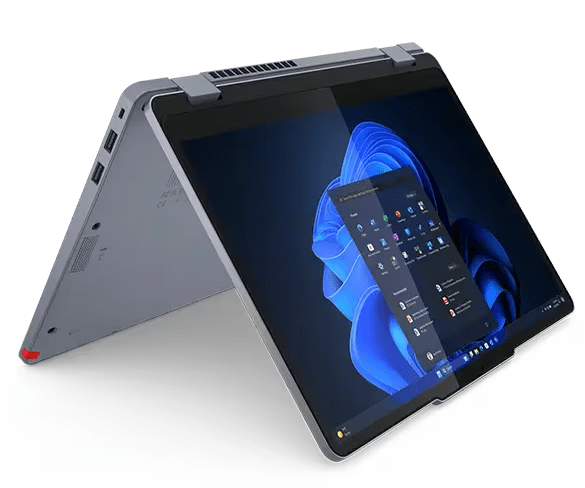
We are pleased to announce that all colleagues** will be provided with a new Lenovo 13” multi-form-factor device including the latest processor models, improved memory, all day battery life, and integrated stylus pen.
These devices have been chosen for their high spec, versatile format and will be paired, in most cases, with a docking station for charging, access to second screens and network resources. Improved Wi-Fi Connectivity of the new devices will ensure the best use of the recent wireless infrastructure upgrades across our Secondary Schools. Enhanced Teaching Flexibility: The new devices can be used in multiple ways (laptop, tablet, tent, stand) allowing staff to teach, present and annotate in the way that best suits the lesson or work environment. Touchscreen & Stylus Support: Ideal for interactive learning, teachers can write, draw and highlight directly on the screen, enabling a more interactive and engaging classroom experience, whether delivering content or reviewing student work. Extended Battery Life: Compared to existing devices, these laptops offer reliable power throughout the majority of the average school day, increasing mobility across classrooms. Docking Station Ready: Seamless transition from mobile teaching to a full desktop experience - simply dock to connect to larger displays, keyboards, and other accessories/peripherals. Lightweight & Portable: Encourages agile movement between classrooms, offices and home - perfect for modern hybrid working and flexible teaching models. Modern Collaboration Tools: Built-in webcam, microphone and flip-mode functionality make it easy to run Teams calls, record lessons, or facilitate collaborative projects. Future-Proofing the Learning Environment: Supports evolving digital teaching strategies and edtech tools with devices that adapt to different needs. Space-Saving & Energy Efficient: Moving away from bulky desktops frees up classroom space and reduces energy usage, aligning with sustainability goals. |
|
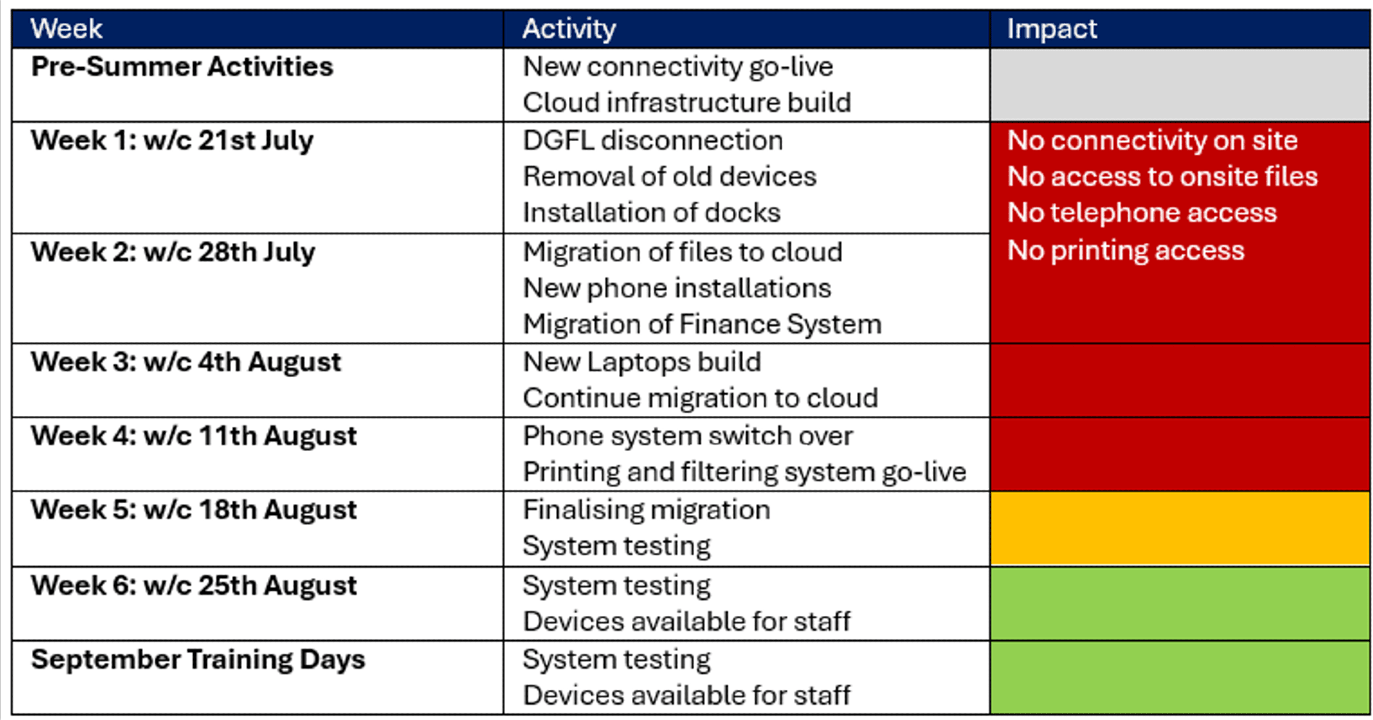
At close of business on Friday 18th July 2025, core DGfL services and connectivity will cease. This means that there will be no internet connectivity on site whilst replacement services are rolled out. The ability to log into desktop computers in our academies, as well as printing from any device, will also be impacted. Staff laptops and access to RM Unify, Microsoft 365 (Outlook, OneDrive, SharePoint, etc.), ClassCharts and Bromcom will continue to be possible while offsite until 28th July 2025. Commencing 28th July 2025, all Microsoft 365 accounts (Outlook, OneDrive/SharePoint, etc.) and shared drives will begin migration to the Trust central services. This is expected to take in the region of 1-2 weeks for all users, and we will keep all staff updated with regular progress updates. During this period, you will not be able to access RM Unify, Microsoft 365 or any services that depend on Microsoft 365 (including ClassCharts and Bromcom). Once the migration has completed, we will be able to begin granting access to your new Microsoft 365 accounts, and all other services that depend on Microsoft 365. Please be aware that while you may be able to log into your staff laptops at various points during the six-week summer period, we cannot guarantee consistent access due to the aforementioned work. If you do use your staff laptop after 28th July 2025, any emails you send or files that you work on may not be migrated to your new account. Unfortunately, our current provider, RM/DGfL, will not permit any interim arrangements to allow user details to be migrated any earlier than the published schedule.
|
|
Please review the high level summer schedule below for key dates, and click here for a more detailed schedule of works. |
|
Please note: This schedule is subject to change depending on project developments. Regular updates will be published here: 2025 IT Project Updates If you require support with any critical issues during the break, please contact [email protected] - however, please note that responses will be limited due to the workload of IT teams across the Trust during the summer break, and we cannot guarantee a response within the normal Service Level Agreement (SLA). We thank you for your patience and understanding during this transition.
|
|
Request early access if required If you would like to access your new account before returning in September, we can send you your new credentials to your personal contact details. Please fill out this form to provide the IT staff with your personal email address and telephone number so that we can communicate your new credentials to you as soon as access is possible, once the migration work has been completed.
|
|
|
| |
|
|